/
DP Requirements CSV
Got feedback or spotted a mistake?
Leave a comment at the end of this page or email contact@krishagni.com
DP Requirements CSV
- Shraddha Ranpise (Deactivated)
- Tushar Tajane
- Abhranil Mukherjee (Deactivated)
Owned by Shraddha Ranpise (Deactivated)
Last updated: Apr 27, 2020 by Tushar Tajane
From v5.0, you can create distribution protocols requirements in bulk via CSV import.
Steps to import CSV
- Go to home page and click on 'Distribution Protocols' card
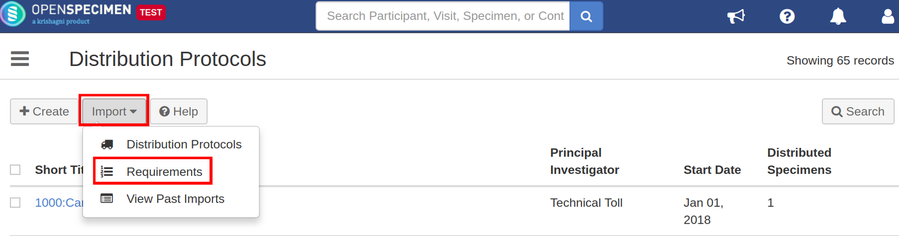
- Click on 'Import' button and select option 'Requirements' from the distribution protocols list page
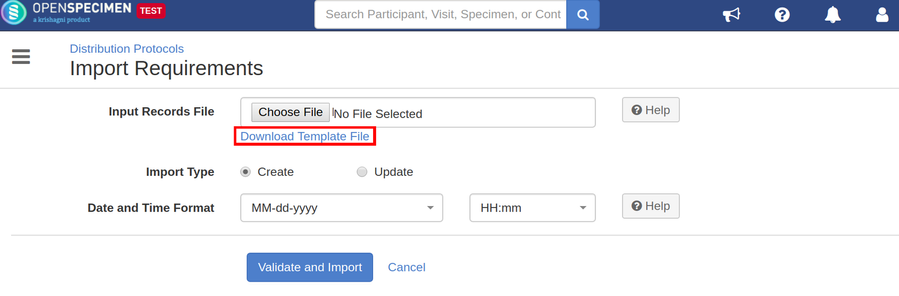
- Click on 'Download Template File' to download the template file
- Enter all valid data in the template file as mentioned in the below 'Data Dictionary' table
- Upload the filled template file in 'Input Records File' field, select 'Import Type' as 'Create' to create or 'Update' to update requirements
- Click on 'Validate and Import' button
- Refer 'Import status' to check the status of import job
Sample CSV
Data Dictionary
| Column Name | Data Type | Mandatory? (Create) | Mandatory? (Update) | Description | Permissible Values | Validations |
|---|---|---|---|---|---|---|
| Identifier | String | No | Yes | The system generated a unique identifier for the requirement | This is used only during edit to update other fields of specimen requirements | |
| Specimen Type | String | No | No | Permissible values for specimen class-type | Should be a valid value from the list | |
| Anatomic Site | String | No | No | Permissible values for anatomic site | Should be a valid value from the list | |
| Pathology Status#1 | String | No | No |
| Should be a valid value from the list | |
| Pathology Status#2 | String | No | No |
| Should be a valid value from the list | |
| Clinical Diagnosis | String | No | No | Should be a valid value from the list | ||
| Specimen Count | Integer | Yes | No | Number of specimens | ||
| Quantity Per Specimen | Double | Yes | No | |||
| Cost | Integer | No | No | Cost of the specimen | ||
| Comments | String | No | No | |||
| Activity Status(Added in v7.0) | String | No | No | Activity status of DP requirements | Active/Disabled | Value "Disabled" is used to delete the DP requirements. |
| Distribution Protocol#Short Title | String | Yes | No | The short title of the DP under which the specimen requirements has to be created | Should be existing within the system |
, multiple selections available,
Related content
Specimen Requirements CSV
Specimen Requirements CSV
More like this
Distribution Protocols CSV
Distribution Protocols CSV
Read with this
Distribution CSV
Distribution CSV
Read with this
Specimens CSV
Specimens CSV
More like this
Specimen Derivative CSV
Specimen Derivative CSV
More like this
Distribution orders CSV
Distribution orders CSV
Read with this
Got feedback or spotted a mistake?
Leave a comment at the end of this page or email contact@krishagni.com